
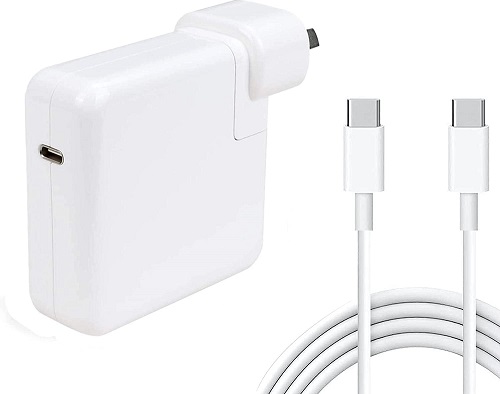
Choosing the right power adapter is essential for getting the most out of your MacBook, whether you’re using a 13‑inch Pro, a 14‑inch Pro, a 16‑inch Pro or a MacBook Air. The tables below break down the exact wattage requirements for each model, explain fast‑charge capabilities and highlight the cables you need for optimal performance.
If you’re unsure which charger or cable best matches your MacBook, Campad Electronics can help. As Australia’s trusted specialists in Apple accessories, Campad Electronics offers a selection of genuine, high‑quality chargers and cables at great value, backed by expert advice to ensure you pick the perfect solution for your device.
13‑inch MacBook Pro
The 13‑inch MacBook Pro models from 2020‑2022 (Intel) and 2022‑2023 (M2) both use a 61W USB‑C Power Adapter as the standard charger and this same adapter provides the fastest charge the chassis can accept; there is no higher‑wattage fast‑charge mode for the M2 version.
Apple’s USB‑C Charge Cable (1m, up to 60W) or the 2 metre version (up to 100W) is recommended. Although the laptop will accept a higher‑wattage charger such as a 96W unit without risk, it will not charge any faster because the device draws only the power it needs.
Using a lower‑wattage adapter, for example 45W, will result in slower charging and may be insufficient to keep the battery topped up during heavy use, potentially leading to gradual drain while plugged in.
| Model Year | Standard Adapter | Fast‑Charge Option | Recommended Cable |
|---|---|---|---|
| 2020‑2022 (Intel) | 61W USB‑C Power Adapter | 61W adapter provides the fastest charge the chassis supports | Apple USB‑C Charge Cable (1m, up to 60W) or 2m (up to 100W) |
| 2022‑2023 (M2) | 61W USB‑C Power Adapter | Same 61W adapter; no higher‑wattage fast‑charge mode | Same USB‑C charge cable |
- The 13‑inch Pro draws only the power it needs, so a 96W charger is safe but does not speed up charging.
- Using a lower‑wattage adapter (e.g. 45W) will charge more slowly and may not keep up under heavy workloads, leading to gradual battery drain while plugged in.
14‑inch MacBook Pro (2021 and later)
The 14‑inch MacBook Pro (2021‑2022 M1 Pro/Max and 2023‑onward M2 Pro/Max) can be powered by a 67W USB‑C Power Adapter as the minimum charger, but fast‑charging requires a 96W USB‑C Power Adapter (or the newer 140W option).
When paired with a compatible cable, either a USB‑C to MagSafe 3 cable or a high‑wattage USB‑C charge cable capable of up to 100W, the fast‑charge adapters can replenish up to 50% of the battery in roughly 30 minutes.
Fast charging is only activated when the adapter supplies at least 96W; using a lower‑wattage adapter such as a 61W unit will still charge the 14‑inch model but will do so noticeably slower and will not reach the fast‑charge threshold.
| Model | Minimum Adapter | Fast‑Charge Adapter | Fast‑Charge Capability | Cable Requirement |
|---|---|---|---|---|
| M1 Pro / M1 Max (2021‑2022) | 67W USB‑C Power Adapter (standard) | 96W USB‑C Power Adapter (or 140W) | Up to 50% charge in ~30 min | USB‑C to MagSafe 3 cable or USB‑C charge cable (up to 100W) |
| M2 Pro / M2 Max (2023‑) | 67W USB‑C Power Adapter | 96 W USB‑C Power Adapter (or 140W) | Same ~30 min to 50% | Same MagSafe 3 or high‑wattage USB‑C cable |
- Fast charging is triggered only when the adapter supplies ≥ 96W and a compatible cable is used.
- A 61W adapter will charge the 14‑inch model, but it will not reach the fast‑charge threshold and will be noticeably slower.
16‑inch MacBook Pro (2021 and later)
The 16‑inch MacBook Pro (2021‑2022 M1 Pro/Max and 2023‑onward M2 Pro/Max) ships with a 96W USB‑C Power Adapter as the standard charger, but to achieve true fast‑charging, up to 50 % in roughly 30 minutes, a 140W USB‑C Power Adapter (PD 3.1) is required.
The 140W adapter works with a MagSafe 3 cable on all models and with a Thunderbolt 5 cable on the M4‑based versions; the M2 Pro/Max models also support a 240W USB‑C charge cable combo. Using the 96W adapter is safe on the 16‑inch Pro, but it will not reach the 30‑minute 50% charge benchmark.
| Model | Standard Adapter | Fast‑Charge Adapter | Fast‑Charge Capability | Cable Requirement |
|---|---|---|---|---|
| M1 Pro / M1 Max (2021‑2022) | 96W USB‑C Power Adapter (standard) | 140W USB‑C Power Adapter (PD 3.1) | Up to 50% charge in ~30 min (with 140W) | USB‑C to MagSafe 3 cable or Thunderbolt 5 cable (for M4 models) |
| M2 Pro / M2 Max (2023‑) | 96W USB‑C Power Adapter | 140W USB‑C Power Adapter (or 240W cable combo) | Same ~30 min to 50% with 140W | MagSafe 3 or 240W USB‑C charge cable |
- The 16‑inch Pro requires the 140W adapter for true fast charging; the 96W adapter provides normal charging speed.
- Using a 96W charger on a 16‑inch model is safe but will not achieve the 50% in 30 minutes benchmark.
General Guidelines
Higher‑wattage adapters are safe because the laptop negotiates the power it draws, so a 96W or 140W charger will not damage a lower‑wattage model; however, never go below Apple’s supplied wattage for sustained use, as lower‑wattage adapters can cause battery drain under heavy workloads.
Cable matters, fast charging requires a cable rated for the adapter’s wattage (e.g., MagSafe 3 or a USB‑C cable supporting ≥ 100W). Only one power source is used at a time, so connecting multiple adapters does not increase charging speed; the system draws from the highest‑power source available. Non‑Apple USB‑C chargers are acceptable if they meet the required power‑delivery specifications and come from reputable manufacturers.
- Higher‑wattage adapters are safe: the laptop negotiates the power it draws, so a 96W or 140W charger will not damage a lower‑wattage model.
- Never go below Apple’s supplied wattage for sustained use; lower‑wattage adapters can cause battery drain under heavy workloads.
- Cable matters: fast charging requires a cable rated for the adapter’s wattage (e.g., MagSafe 3 or a USB‑C cable supporting ≥ 100W).
- Only one power source is used at a time: connecting multiple adapters does not increase charging speed; the system draws from the highest‑power source available.
- Non‑Apple USB‑C chargers are acceptable if they meet the required power delivery specifications and are from reputable manufacturers.
Quick Reference
The 13‑inch MacBook Air with the M2 chip uses a 61W minimum power adapter and does not support a faster charging mode, reaching roughly 0% to 50% in about 1 hour 15 minutes.
The 14 inch MacBook Pro models equipped with M1 or M2 Pro/Max processors require a 67W minimum adapter, while fast charging is possible with a 96W (or 140W) adapter, achieving the 0%–50% charge in approximately 30 minutes.
The 16‑inch MacBook Pro (M1 or M2 Pro/Max) calls for a 96W minimum adapter and can fast‑charge with a 140W adapter, also reaching 0%–50% in roughly 30 minutes.
| Model | Recommended Minimum Adapter | Fast‑Charge Adapter | Typical 0‑50% Time |
|---|---|---|---|
| 13‑inch (M2) | 61W | , (no faster mode) | ~1 h 15 min |
| 14‑inch (M1/M2 Pro/Max) | 67W | 96W (or 140W) | ~30 min |
| 16‑inch (M1/M2 Pro/Max) | 96W | 140W | ~30 min |
Use the adapter and cable pair that matches the model’s fast‑charge specification to achieve the shortest charging times while maintaining battery health.
Final Thoughts
In summary, matching your MacBook Pro or even a MacBook Air, to the appropriate wattage adapter and cable is essential for optimal charging speed and battery health. Whether you need a standard 61W charger for a 13‑inch model, a 96W (or 140W) fast‑charge solution for the 14‑inch and 16‑inch variants or simply want confidence that a higher‑wattage charger won’t cause damage, the right combination makes all the difference.
For expert guidance and a selection of genuine, high‑quality chargers and cables, turn to Campad Electronics. As Australia’s trusted specialists, they offer competitive pricing, reliable products and knowledgeable advice to help you choose the perfect power solution for any MacBook.
FAQs
What wattage adapter should I use for a 13‑inch MacBook Pro (M2)?
A 61W USB‑C Power Adapter is the standard and fastest charger the 13‑inch M2 Pro supports. Higher‑wattage adapters (e.g., 96W) are safe but won’t charge faster.
Can I use a lower‑wattage charger on my 13‑inch MacBook Pro without damage?
Yes, but charging will be slower and may not keep up with heavy use, potentially causing the battery to drain while plugged in.
Which cable is required for fast‑charging a 14‑inch MacBook Pro?
A USB‑C to MagSafe 3 cable or a high‑wattage USB‑C charge cable rated for ≥100W. The cable must support the adapter’s wattage (96W or 140W).
Does a 61W adapter fast‑charge a 14‑inch MacBook Pro?
No. Fast‑charging requires at least a 96W adapter; a 61W unit (or higher) will charge the laptop but more slowly and won’t hit the 0% to 50% in ~30 minutes benchmark.
What is the standard adapter for the 16‑inch MacBook Pro and what do I need for fast‑charging?
The standard adapter is 96W USB‑C. For true fast‑charging (≈50% in 30 min) you need a 140W USB‑C Power Adapter (PD 3.1) with a MagSafe 3 cable (or a Thunderbolt 5/240W cable on compatible models).
Is it safe to use a 140W charger on a 13‑inch or 14‑inch MacBook Pro?
Yes. The laptop negotiates the power it draws, so using a higher‑wattage charger will not damage a lower‑wattage model; it will simply draw the amount it needs.
Can I mix and match Apple and third‑party USB‑C chargers?
Yes, provided the third‑party charger meets the required Power Delivery specifications and is from a reputable manufacturer.
Will using multiple chargers simultaneously charge my MacBook faster?
No. Only one power source is used at a time; the system draws from the highest‑power adapter connected.
What happens if I use a cable that isn’t rated for the adapter’s wattage?
The cable will limit the power transfer, preventing fast‑charging and possibly causing slower charging or no charging at all if the rating is too low.
How long does it take to charge 0% to 50% on each MacBook model?
- 13‑inch (M2): ~1 hour 15 minutes (61W)
- 14‑inch (M1/M2 Pro/Max) with 96W or 140W: ~30 minutes
- 16‑inch (M1/M2 Pro/Max) with 140W: ~30 minutes. Using lower‑wattage adapters will increase these times.